Open source session replay uses saved browser data to show what a visitor did. Open-source session replay software has a license that allows you to use, inspect, modify, and redistribute its code. Your support team can see what happened before a reported problem.
Your team must keep data capture private and safe, and do the work of running replay. You also need useful details in support tickets and rules for how long to keep data.
Open source and self-hosting, running the software yourself, are separate choices. A clear support process helps you decide who will maintain data capture. It also helps you plan how agents will use the results.
How open source session replay reconstructs a visit
A support agent usually watches a visit rebuilt from data captured in the customer’s browser. That data describes the page’s structure and how the customer used it. The playback is not a screen video.
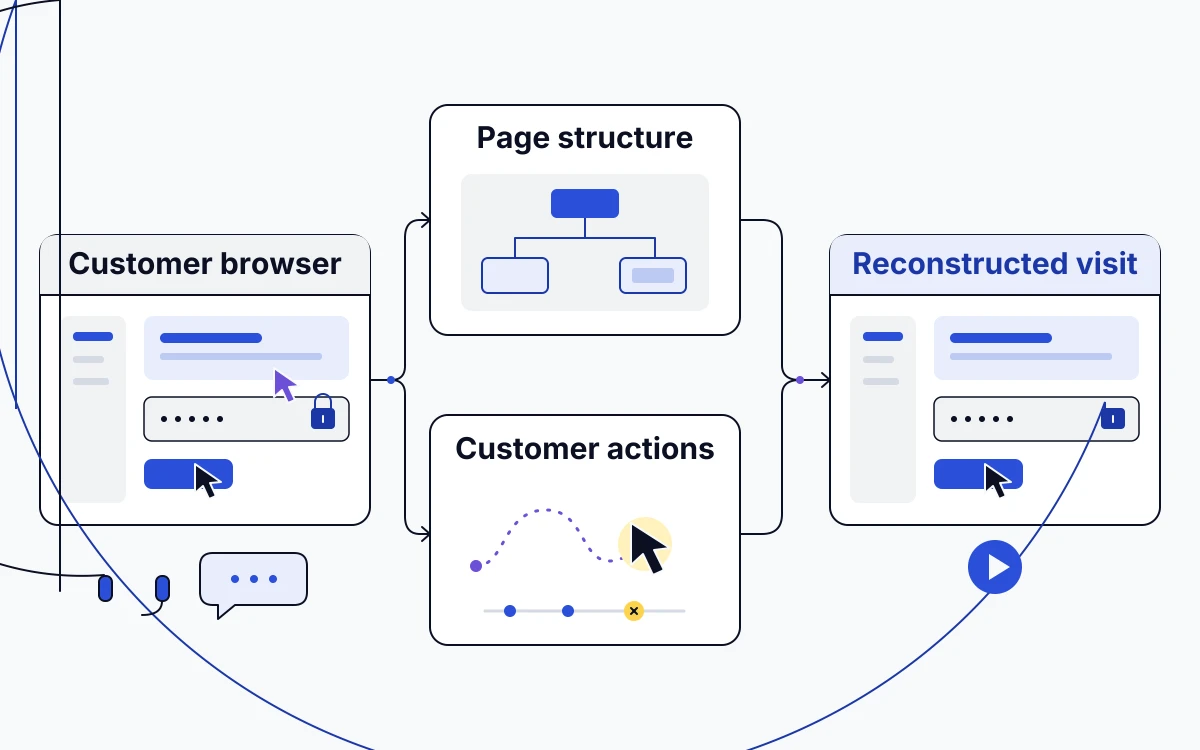
The DOM is how the browser represents a page: its text, fields, buttons, and other elements. A DOM snapshot captures that structure at one moment. Changes describe what happens next, such as an error message appearing or a menu opening. Some replay systems use those snapshots or changes to rebuild the visit. They combine them with clicks, scrolling, and other data about how the customer used the page.
The customer uses the actual website. The agent watches a separate playback built from the captured data. Watching it does not change the customer’s page. The agent can see only what was allowed to be captured.
When replay helps resolve a support ticket
Use replay, a view of the customer’s visit, when a ticket depends on their steps through a page.
Replay is useful for:
- Failed forms: Look at the steps around submitting a form and any messages about missing or incorrect entries.
- Confusing steps: Follow where the customer pauses, repeats an action, or returns to an earlier page.
- Actions before errors: Find the steps leading to the failure so engineering can repeat them.
Start by asking: “Which page were you on when it failed?” That gives you a place to look. It also helps connect the reported problem to the captured visit.
When passing the ticket to engineering, include the relevant replay, the expected result, and the steps leading to failure. Add the application’s state (what was happening in the app) and backend context (what happened on the server). These details help engineering trace the cause.
Move from capture to a usable support replay
Open playback at the page and action your customer reported. That sequence gives you a starting point for checking browser errors and network requests alongside the customer’s steps.
Choose session capacity around captured visits, and retention around investigation time. Your plan should cover both your monthly captured visits and the time between a customer’s report and engineering’s investigation. Assign someone to review those needs when captured-visit volume or investigation delays change.
Separate support-workflow example
In coview, password and card fields, plus content marked with data-coview-mask, are masked in the visitor’s browser before reaching us. Monthly recorded-session allowances and retention are: Free, 1,000 sessions and 7 days; Starter, 5,000 sessions and 30 days; Growth, 25,000 sessions and 90 days.
Decide whether your team can own the replay workflow
Keep capture off until sensitive-data checks pass and every job has an owner. These are editorial recommendations to help you decide whether your team is ready to run replay.
- Name an owner and a backup for setup, updates, storage, access, and deletion. One person can cover several jobs, but each job needs both.
- An owner needs to review the open-source license’s terms for using, inspecting, modifying, and redistributing the code.
- Before setup goes live, decide which page content may leave the browser and test with made-up sensitive values. Input redaction removes sensitive values from form fields. Test masking by CSS selector, which hides page elements identified by a code rule. Capture-time sanitization removes sensitive data before the browser sends it to a server. Test this for network requests as well as page content. Inspect what leaves the browser and what reaches storage. Values hidden during playback may still be captured.
- Write down where captured data lives, who can view it, how long it stays, and who handles deletion. If a provider runs any part of this work, ask for specifics about that part.
- Confirm that a ticket can include the relevant replay and console errors, the browser’s error messages. It also needs network request context: details about the requests the browser sends. None of this should expose sensitive values. Someone must own this handoff and maintain it as your application changes.

We build coview: session replay, co-browsing, chat and calls for support teams. Questions about a post? Ask us from the contact page.