coview: watch what happened, guide them on their screen, and talk it through.

Watch

Every visit replayed with its clicks, rage clicks and console errors — and anyone on your site right now, live.

Guide

Point, draw or take over on the customer's own tab, after they say yes. Esc gives it back at once.

Talk

A chat on every page, and voice or video calls in the browser. Nothing to install, no meeting link.

coview is the support desk that sees what your customer sees — session replay, co-browsing, chat and calls on one timeline, from one script tag.

Free plan, no card14 days of every featureLive in five minutes

One script tag on any website or web app — no extension, no download for your customers.

  • React
  • Next.js
  • Vue
  • Angular
  • Shopify
  • WordPress
  • Webflow
01Watch

Know what happened before they finish typing.

Open the customer's session from the chat and see the clicks, the errors and the page they're stuck on — or watch them live, a second behind.

Every visit, replayed

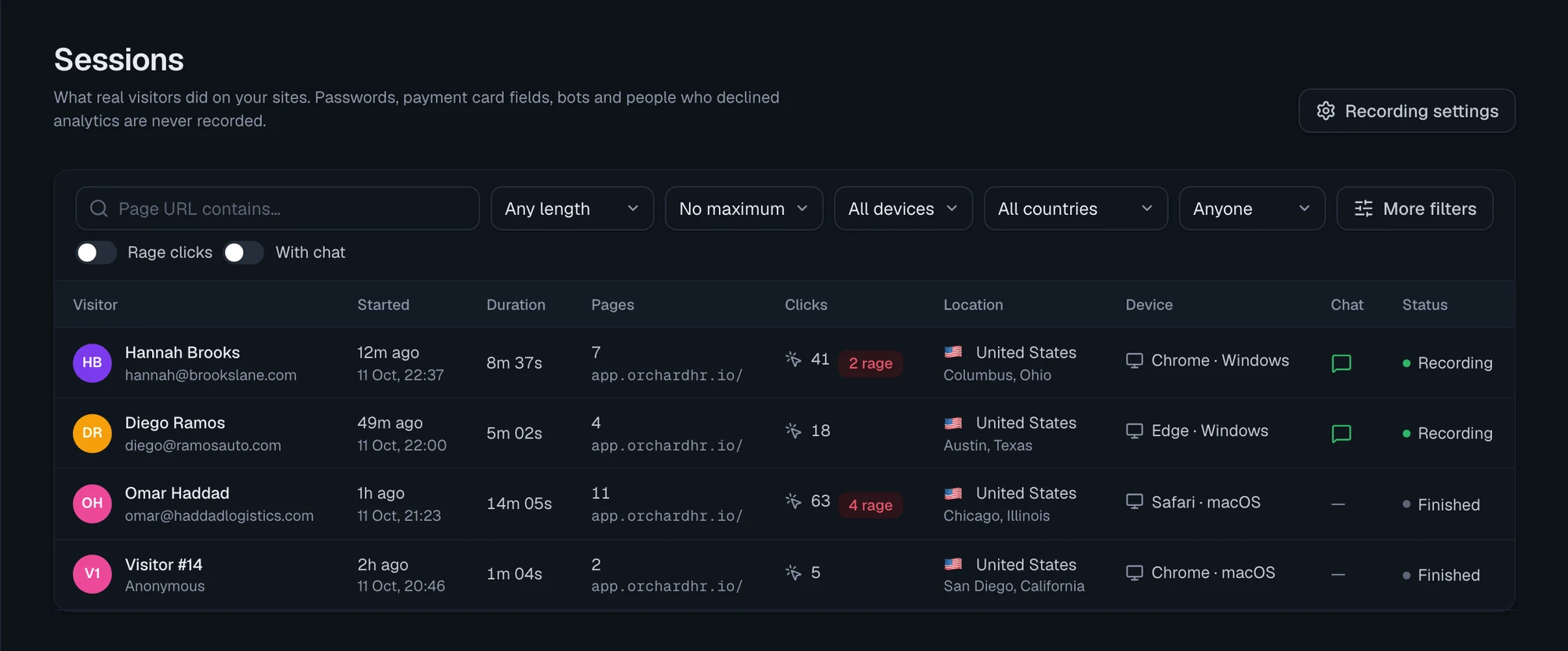
Pages, clicks, scrolls and rage clicks as they happened. Jump to the second it broke.

ConsoleNetworkSteps
GET /payroll/runs/8812 · 200
TypeError: rate is undefined · tax.js:212
POST /api/taxes/calc · 500 · 1.2 s
Rage click ×4 · button “Continue”

Errors on the same timeline

Console errors and failed requests sit next to the click that caused them. Engineering gets the whole story.

HB
Hannah BrooksRun payroll · 9 min · Columbus, OH
DR
Diego RamosTime off › Calendar · 4 min
PN
Priya NairPricing · from Google · 2 min

Who's here, right now

Live now lists everyone browsing and what they're looking at — one click to chat, call or co-browse.

Find the sessions that matter, not every session.

Filter by rage clicks, errors, a page, a country or a customer. Passwords, card numbers and anything you mark private are masked in the visitor's browser — they never reach coview.

Rage clicksWith a chatPage contains /payrollLonger than 2 min
Rage clicks are a to-do list
coview.work/app/sessions
The coview Sessions page: each recorded visit with its length, pages, clicks, rage clicks, location and device.
“When a chat passes five messages without a fix, stop typing and start watching.”
The coview blog
The five-message ruleHow support teams use replay before they ask for screenshots
Read the post
02Guide

Watching is quiet. Touching asks first.

Two levels of help a customer understands at a glance — asked for in every session, and stopped with a single key: Esc

Payroll › Run 8812 › Taxes

State taxes for Texas

WaitingContinue2Then press Continue

Show me — point and draw

A pen, a highlighter, arrows with a note, numbered steps and a spotlight on their own page. Marks stay pinned to the page as they scroll until the agent erases them, and the customer's mouse stays theirs.

How Show me works
LP

Linh wants to control this tab

They can click, scroll and type, in this tab only. Passwords and card numbers stay hidden. Esc stops it.

Only let them pointDenyAllow

Take over — click and type

For a long settings page, or when they say “can you just do it?”. Asked for separately, visible the whole time.

Linh is showing you on this tabCircleStop · Esc

Always theirs to stop

A pill on their page says who is helping. Esc or Stop ends it at once, and they can circle things for you too.

Masked before it leaves the browser

Password and card fields — and anything you mark with data-coview-mask — are hidden in the customer's browser, in replays and live. Agents never type into password, card, bank or tax-number fields, even in Take over.

Read how masking works
Email[email protected]Visible
Password••••••••••Masked
Card•••• •••• •••• ••••Masked
Salary••••••You chose
03Talk

A chat on every page. A call when typing is too slow.

Conversations, calls and follow-ups live in one place — with the customer's session one click away.

Voice & video calls

Call them from the chat. They answer in the browser.

No app, no meeting link, nothing to install. Either side starts the call; voice by default, and each person turns their own camera on.

  • Rings the right personThe conversation's assignee rings first, then everyone online.
  • Share your screenShow the steps on yours while they follow on theirs.
  • Follows them page to pageThe call carries on as they move around your site.
  • Nobody free? A messageAfter 45 seconds they're offered to leave one instead.
  • Never recordedOnly a log in the chat: who called, when, how long.
  • Minutes on every paid plan300 on Starter, 2,000 on Growth, 5,000 on Business.
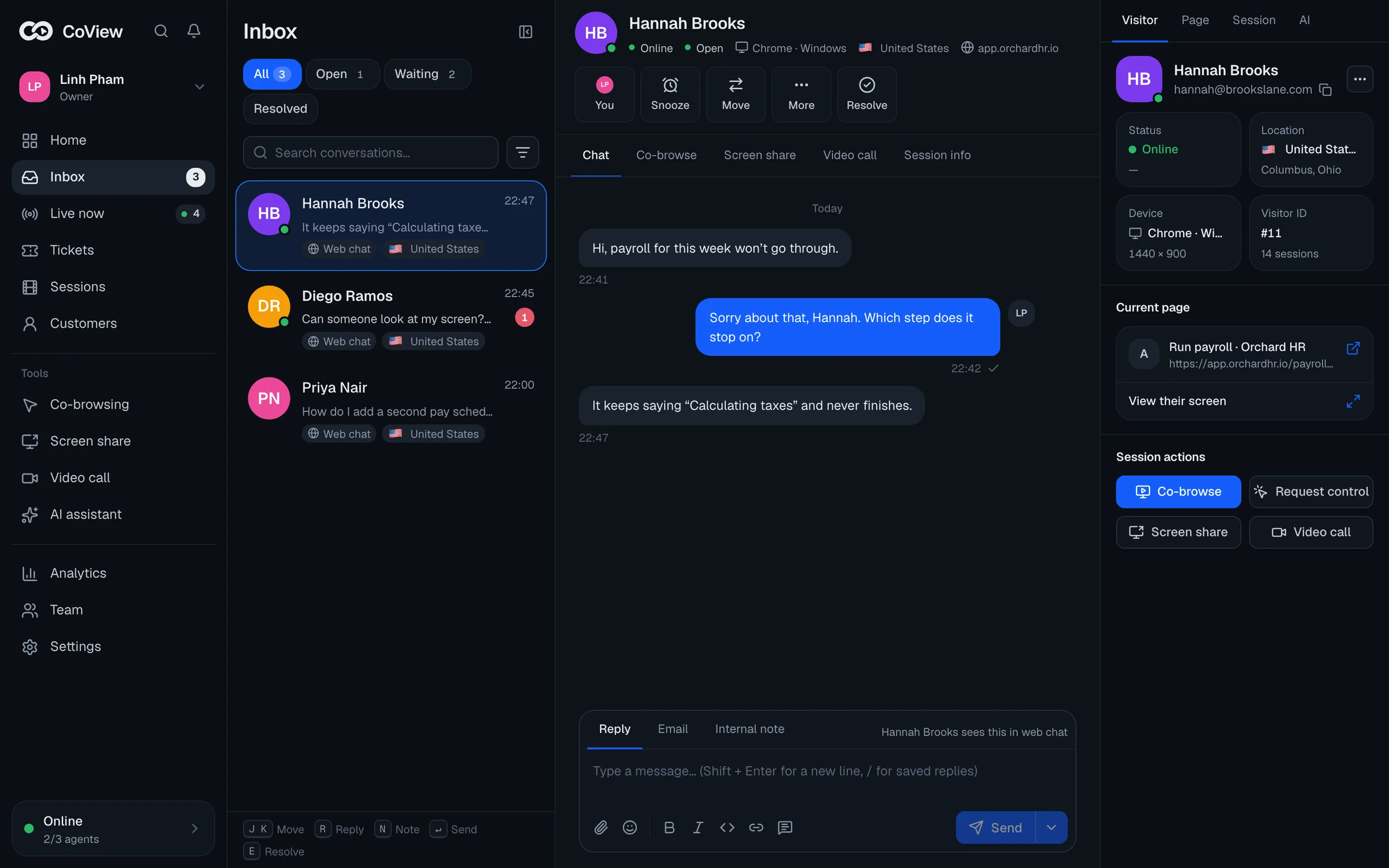
Hi — payroll for this week won't go through. Sorry about that, Hannah. Which step does it stop on? It keeps saying “Calculating taxes” and never finishes. taxes-step.png212 KB · image

Live chat on every page

Files and screenshots up to 10 MB both ways, saved replies, internal notes, and email when they've left.

When to stop typing
#1041HighBugdue in 2h 07m
Taxes fail for employees in Texas with no state rate
Session attached · 8m 37s2 errors · 4 rage clicks · 7 pages
Tracker14 customers waiting · solve once, tell everyone

Tickets that keep the evidence

A chat that needs more time becomes a ticket with the session, the errors and the steps already attached.

From chat to ticket
coview.work/app/inbox
The coview inbox: conversations on the left, the chat with Hannah in the middle with tabs for Co-browse, Screen share and Video call, and her visitor details and session actions on the right.
The inbox: the chat, a co-browse, a call and the customer's session, in one conversation.
Why coview

One tab instead of four.

What helping a stuck customer looks like with a replay tool, a chat tool and a meeting link — and with coview.

coviewThe usual stack
Seeing the problem

Open their session from the chat — clicks, errors and the page they're on.

Ask for screenshots, then a recording, then the browser version.

Showing the fix

Point, draw or take over on their own tab, after they say yes.

Send a meeting link and hope the app installs.

Talking it through

Voice or video from the chat, in the browser, with your screen shared.

A separate meeting tool and a separate invite.

Following up

The ticket carries the session, the errors and the steps.

Paste the context into a ticket by hand.

Privacy

Private fields masked in their browser; every take-over asked for and logged.

Whatever the shared screen happens to show.

Setup

One script tag. One bill.

Three vendors, three scripts, three bills.

Built for teams that answer to security.

Masked at the source, permissioned in the console, and logged when anyone watches or takes over.

Read what we collect
  • Masked at the sourcePrivate fields are hidden before anything leaves the visitor's browser.
  • Single sign-onGoogle, Microsoft or your OpenID Connect provider. SAML on Enterprise.
  • SCIM provisioningPeople join and leave coview with your identity provider.
  • Audit logWho asked to help, who took over, who changed what — exportable.
  • Roles you defineDecide who may watch, draw, take over, call or read every chat.
  • Your retentionKeep recordings from 7 days to 2 years, then they're deleted.
  • Calls aren't recordedOnly a log of who called, when, and for how long.
  • Erase on requestDelete a person and everything about them: sessions, chats, files.
Setup

Live in five minutes. No engineers waiting.

  1. 1
    Add the snippetBefore </body> on every page, or through your tag manager.
  2. 2
    Say who's signed inOptional: their sessions, chats and calls come together in one profile.
  3. 3
    Help the next person stuckOpen Live now — watch, ask to help, or call.
index.html
<!-- coview: chat, replay, co-browsing and calls -->
<script async
  src="https://coview.work/assets/cv-sdk.js"
  data-coview-key="pk_live_…"></script>

<!-- optional: who is signed in -->
<script>
  window.coview = window.coview || function () { (coview.q = coview.q || []).push(arguments); };
  coview('identify', {
    email: '[email protected]',
    name: 'Hannah Brooks',
  });
</script>
Pricing

Start free. Pay per seat as you grow.

Replay, co-browsing and chat on every plan. Prices per seat a month, billed yearly.

Free

For trying coview on a small site.

$0forever,
up to 2 seats
Start for free
  • 1,000 sessions a month
  • 10 co-browsing sessions
  • Live chat and tickets

Starter

For a small team answering every day.

$19per seat
a month
Start a trial
  • 5,000 sessions, kept 30 days
  • Unlimited co-browsing
  • 300 call minutes

Growth Most teams

For teams with response targets and an API.

$49per seat
a month
Start a trial
  • 25,000 sessions, kept 90 days
  • 2,000 call minutes
  • Targets, trackers, REST API

Business

For SSO, an audit log and your own roles.

$89per seat
a month
Start a trial
  • 100,000 sessions, kept a year
  • 5,000 call minutes
  • SSO, audit log, custom roles
Enterprise: SAML, SCIM, 1M sessions and volume pricing — from about $1,500 a month.Compare every plan

Help the next customer in minutes, not messages.

Free to start. Your first session shows up as soon as the snippet is on your site.