Live chat support lets customers message your support team in real time through a small chat box on your website. It works best for questions you can answer while customers browse. Issues that need more digging should have a clear path to the next person.
Before launch, decide when your team will stop typing and who will cover chat. You also need a plan for passing issues to someone else. To make that plan, understand what customers and agents see and how a chat becomes an issue you track. Know how chat access differs from the amounts of recording and call time allowed.
How customers and agents exchange messages
The customer types a question into the live chat widget, the chat window on your site. Your agent receives the message and sends a reply that appears in that same window.
Customers see their question and your answer together. They can ask a follow-up without leaving the conversation. As the agent, you read the question and reply with an answer. You can also send a direct link to a help article, tutorial, or FAQ (frequently asked questions).
For example, a customer might ask where to find an invoice. Your agent can explain where to look and share the help page: “Here’s the guide to finding your invoice. Which step are you on?”
Live chat is how the messages pass between you and the customer. Replies can come from a person, a chatbot, or both. A chatbot is software that sends automated answers. With human support, a customer support representative reads and responds to messages. When describing your service, say who answers so customers know whether they’re speaking with a person.
When a conversation helps—and when typing stops helping
Use chat when a short exchange can clear up a question. When the problem depends on what the customer sees, switch approaches. Asking for another description won’t help.
- Browsing questions: Help a visitor find the information they need on the page they’re viewing.
- Sales inquiries: Clarify what the visitor needs and answer questions before they decide to buy.
- Onboarding, or getting started: Explain the next setup step and find out where the customer got stuck.
When you need to see the problem, co-browsing lets you view the customer’s page. You can then guide them through the technical steps. The customer stays on their own screen. Show me asks permission to point, draw, highlight, and number steps on the customer’s page. Take over asks separately for permission to click and type in that tab. The customer can end either with Esc. Password and card fields, plus anything marked with data-coview-mask, are masked in the visitor’s browser before reaching us.
Agree as a team to switch approaches after five messages without progress. Treat this as a working rule, not a target based on measured results. If seeing the page would help, offer co-browsing. Issues that need deeper work can go to someone who can investigate. Include the customer’s question and what you’ve already tried when you pass the issue along.
An agent can say: “Let’s switch approaches so you don’t repeat everything.”
Move from a website message to a tracked issue
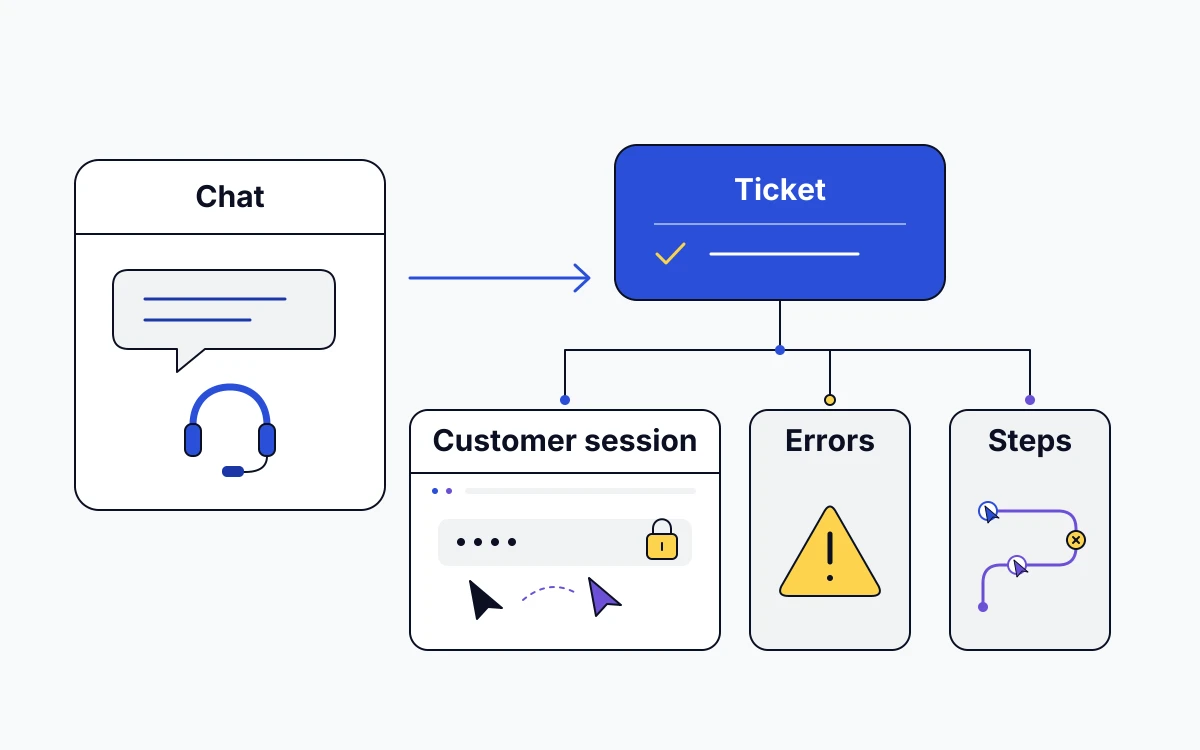
Keep the conversation and the investigation together. When a chat needs more time, turn it into a ticket with the customer’s session, errors, and steps attached.
- Install coview with one script tag. Customers install nothing, and live chat works on every page.
- You can answer the customer with a saved reply and add internal notes for your team. The customer sees the exchange in the website’s chat window. If the visitor leaves, you can follow up by email rather than waiting for them to return.
- Customers and agents can send files up to 10 MB each, in either direction. Ask for a file when it helps resolve the specific question; an attachment shouldn’t be a routine requirement. An agent can say: “You can attach the file here so I can check the problem you described.”
- Turn a chat that needs more time into a ticket with the session, errors, and steps attached. The next person gets the conversation’s context alongside the work to investigate.
Before the customer leaves, explain what happens next: “This needs more investigation. I’ll turn it into a ticket with the steps you’ve already shared.”
Separate chat access from recording and call allowances
Budget for seats and the visit history your team needs to keep. Recorded-session limits count visits, not chat messages, and do not establish an unlimited chat allowance. Every plan includes live chat, session replay, and co-browsing.
| Limit | Free | Starter |
|---|---|---|
| Price | $0 | $19 per seat a month, billed yearly |
| Seats | Up to 2 | Up to 10 |
| Recorded sessions per month | 1,000 | 5,000 |
| Recording retention | 7 days | 30 days |
| Co-browsing sessions per month | 10 | Unlimited |
| Call minutes | Not specified in these plan details | 300 |
A recorded session is one visit by one person, regardless of how many pages they open. Bots and visits where no person showed up are excluded.
Call minutes count each person on the call. Calls are never recorded.
Choose between these plans based on your seat count, the monthly visits you need recorded, and how long agents need recordings for follow-up.
A new workspace can try every feature for 14 days without a card. It automatically moves to Free unless you choose a plan. Before the trial ends, account for Free’s lower allowances for recorded visits and how long you can keep them.
Set your coverage and handoff rules before launch
Offer live support only during hours when someone is assigned to respond. Before launch, decide who handles new chats and who is responsible for issues that need more work.
- Name the agent responsible for new chats during each shift. If agents also answer requests elsewhere, make sure they can handle both workloads.
- Publish support hours you can staff, rather than promising full-day availability. Customers should see an offer of live help only when someone can respond.
- Decide who takes over when the first agent cannot fix an issue. Choose who keeps the customer updated, too. Before leaving the customer waiting, explain what you need to look into: “I’m checking this; I’ll explain the next step.”
- Before closing, ask whether the fix worked for the customer. If it did not, keep a named person responsible for the next step.

We build coview: session replay, co-browsing, chat and calls for support teams. Questions about a post? Ask us from the contact page.