A support service level agreement (SLA) sets out what support you provide and when you’re available. It sets targets for how quickly you respond and how soon you fix a problem. It also explains how you track results and what happens if you miss a promise. Start with your support hours and how problems affect customers. Then agree on targets your team can meet.
To draft your agreement, use the outline, which you can adapt to your needs. The sample targets are grouped by priority: how urgently a problem needs attention. The steps show how to turn customer chats into tickets, or records of support requests, with details that back them up. Use the checklist to review the agreement before you publish it.
How a support service level agreement works
A support service level agreement (SLA) sets a clear start and endpoint for each target. It gives you and the customer a record you can both review. It also spells out what your team and the customer must do.
Keep these commitments separate:
- First response time: How long the customer waits for the first reply. Define what counts as a response.
- Resolution time: How long it takes to fix the issue. Agree on what counts as fixed. Set rules for time spent waiting for details from the customer.
- Service availability: Whether the service is available over an agreed period. This is often called uptime: the time the service is working. A prompt support reply does not mean the service is working again.
Your agents need to confirm they received a report and assess how the issue affects the customer. Their job also includes asking for missing details and sharing progress. Customers need to describe the problem and explain how it affects them. They also need to provide the details your team needs to look into it.
The agreement should name the timestamps you collect: the recorded times of key events. It should also explain how you calculate and report results. You and the customer can then review missed targets using the same records and calculations.
Operational escalation means naming the next person responsible for moving a stalled or urgent issue forward. Contractual remedies are what you owe when you miss a commitment. These may include agreed compensation or service credits, which are credits toward service charges. Passing a ticket to the next person does not replace what you owe under the agreement.
When shared targets help—and when they do not
Use shared targets when support work follows a set pattern and customers have similar day-to-day needs. Set commitments for each customer when their hours, compliance concerns, or business impact call for different support.
- Service-based commitments set the same targets for everyone using a service. They suit IT and application support that follows a set pattern. Examples include email, device provisioning (setting up devices for use), and account access.
- Customer-based commitments set terms for one customer or business unit. They fit when that customer's work schedule or need to keep services running calls for different support. These commitments cover the services you provide to that customer or unit.
- Blanket targets, which apply to everyone, are a poor fit when needs differ. One target can leave customers with critical needs waiting too long. It can also commit you to needlessly costly coverage for less urgent work.
- Custom terms for every customer are a poor fit without a day-to-day reason for them. Each change adds work to track results and manage commitments as your customer base grows.
Before adding an exception, name the day-to-day need it serves and who will track that commitment.
A support SLA outline you can adapt
Give every promise a rule for timing, a way to measure it, and an owner. You can fill in the agreement fields below with your customer.
Coverage and responsibilities
- Scope: [Customers, services, request types, and support channels covered].
- Exclusions: [Services and situations outside the agreement].
- Support hours: [Days, opening and closing times, time zone, and holiday calendar].
- Your responsibilities: [Who responds, investigates, provides updates, and takes charge when an issue needs more help].
- Customer responsibilities: [Required report details, access approvals, and when contacts must be available].
- Remedies and disputes: [Agreed action for a missed target, how to make a claim, deadlines, and who handles disputes].
Priorities and targets
Set priority by how an issue affects the customer. Include whether a workaround, or another way to get the task done, exists. The definitions and deadlines below are examples, not suggested standards or guarantees.
| Priority | Example customer impact | Response target | Resolution target |
|---|---|---|---|
| P1 | Critical service unavailable; no workaround | Within 15 minutes | Within 4 hours, with continuous work |
| P2 | Important function impaired; work can continue | Within 1 hour | Within 1 business day |
| P3 | Limited impact; workaround available | Within 4 business hours | Within 3 business days |
Clocks, measurement, and escalation
- Clock rules: [Total time passed or business hours for each target]. The agreement needs to define the length of a business day and how after-hours requests are handled. It also needs to cover allowed pauses and what happens when priority changes.
- Measurement: [Where you get the recorded times for receipt, first response, and resolution, meaning the issue is fixed]. Define what counts as a response or a fix so you can compare times with targets. Explain how paused time is subtracted and how reopened issues are counted.
- Escalation: [When to ask for more help, who asks, who receives the request, and where updates are sent]. For example, an issue still unresolved at 50% of its allowed fix time could trigger an escalation update. This update would give an estimated fix time and say what remains uncertain.
- Reporting and review: [Report owner and recipients]. An example schedule includes a monthly service-level agreement (SLA) dashboard showing results and a quarterly service review.
Move from a customer chat to an evidence-backed ticket
When a chat needs more work, move the customer’s report and details that support it into a ticket. Keep the customer informed as you investigate. A replay shows what happened during the visit and helps explain the problem. Measure service-level agreement (SLA) performance separately to track whether you meet agreed service targets.
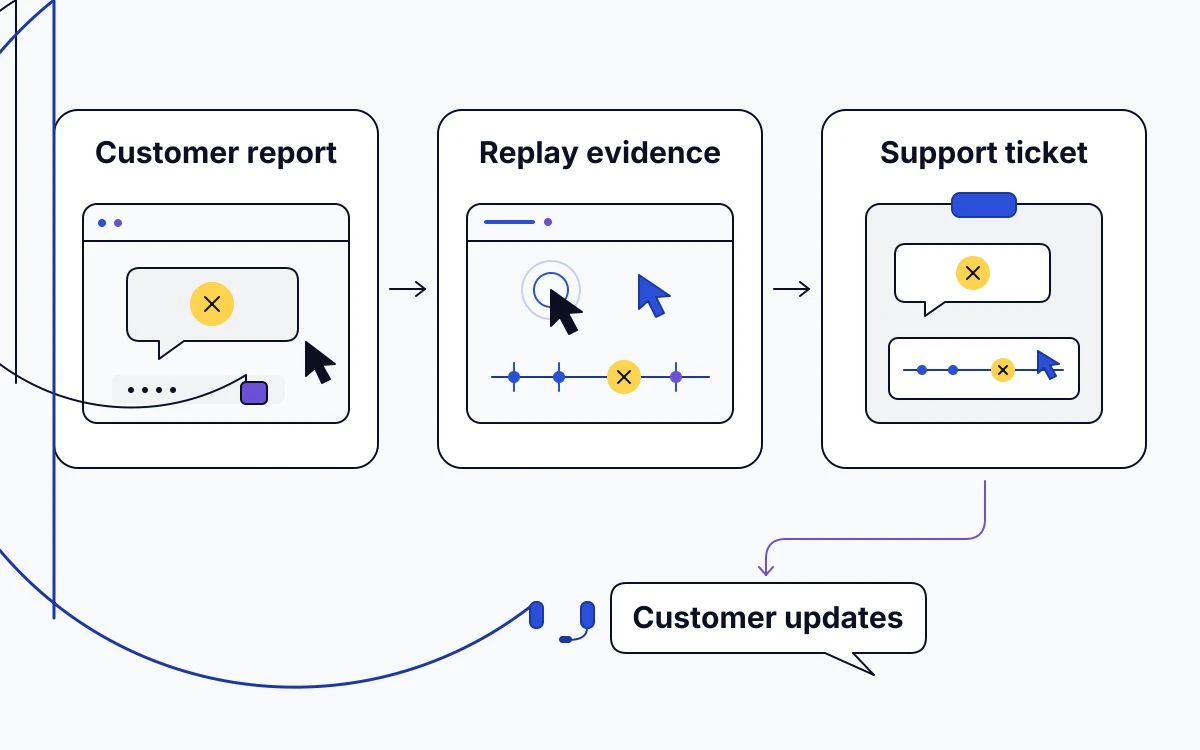
- Answer the chat with a clear acknowledgment: “I've received your report. I'll confirm the priority and next update time.” In coview, you can answer on the page where the customer needs help and exchange files. See The chat widget: Live chat on every page, with files.
- Review the replay’s pages, clicks, scrolls, and rage clicks (repeated clicks in frustration). Also review console errors (error messages from the page) and network requests (requests for data). These details help you ask more focused questions, so the customer doesn’t have to repeat everything. See Watch a recorded session: Replay with clicks, rage clicks, console and network.
Password and card fields, plus anything marked data-coview-mask, are hidden in the visitor’s browser. That content never reaches coview. Leave time to review the details before the recordings expire. Free includes 1,000 recorded sessions a month kept 7 days; Starter includes 5,000 kept 30 days; Growth includes 25,000 kept 90 days.
- Turn a chat that needs more time into a ticket. Attach the session, errors, and steps. Set its priority using the agreement’s definitions of how a problem affects the customer. The ticket also needs an owner. See Tickets, priorities and response targets: Chats that become tickets with the evidence attached.
- Send an update with the confirmed priority and what happens next. Include when the customer can expect another message. Use email if the visitor has left. Your agreed measurement process should track deadlines for responding, fixing the problem, and escalating it for further help. Track those separately from how long replays are kept.
Check these commitments before you publish
Publish only after you have checked staffing, how results are measured, and who owns each handoff. Both parties must approve the agreement first.
- Customer fit: The agreement should define what support covers and which issues get priority. Both should match the customer’s needs.
- Staffing: Check that available staff can meet every promised deadline. This applies to every covered contact method and support period.
- Measurement: Each target needs clear rules for when its clock starts and stops. It also needs a data source and someone responsible for reporting results.
- Internal handoffs: Name the support and engineering owners and their deadlines. State who must step in when an issue needs more help. An operational level agreement (OLA) records these internal commitments. They support the external service level agreement (SLA).
- Approval: Both parties should review who does what, deadlines, contact methods, and how results are measured. They should also review remedies for missed commitments and the steps to follow. Revise any commitment you have not checked before seeking approval to put the agreement into use.

We build coview: session replay, co-browsing, chat and calls for support teams. Questions about a post? Ask us from the contact page.