When you close a ticket because the customer didn’t respond, your message should do three things. Name the request. Say that the information you needed to go on hasn’t arrived. And give a checked way to contact support again. There’s a sample below. Send a final reminder with a clear reply deadline first. Silence means the ticket went quiet. It doesn’t mean the issue is solved.
Give your team a closing email they can copy, a separate reminder, and a follow-up schedule everyone agrees on. Before any ticket closes, log each contact attempt and check the record.
A sample email for closing a ticket due to no response
Keep the closing email short. Tell the customer what to do next, even when that’s nothing at all.
Subject: Closing support request [ticket ID] for now
Hi [name],
We’re closing ticket [ticket ID] about [issue] for now because we haven’t received [missing information] requested in our last message.
The request will be marked inactive. We haven’t confirmed that the issue is resolved.
If you still need help, please [verified contact route and action] and include your ticket ID and [missing information]. If anything in this message is incorrect, please let us know through that same route.
If you no longer need help, no action is required.
Thank you,
[agent name]
[support team]
The contact placeholder needs an instruction you’ve checked, such as “submit a new request through [support form URL].” Only write “Reply to this email” if that inbox accepts customer replies and sends them to the right place. Don’t promise that a reply reopens the ticket by itself unless you’ve confirmed it does.
Send a clear reminder before you close
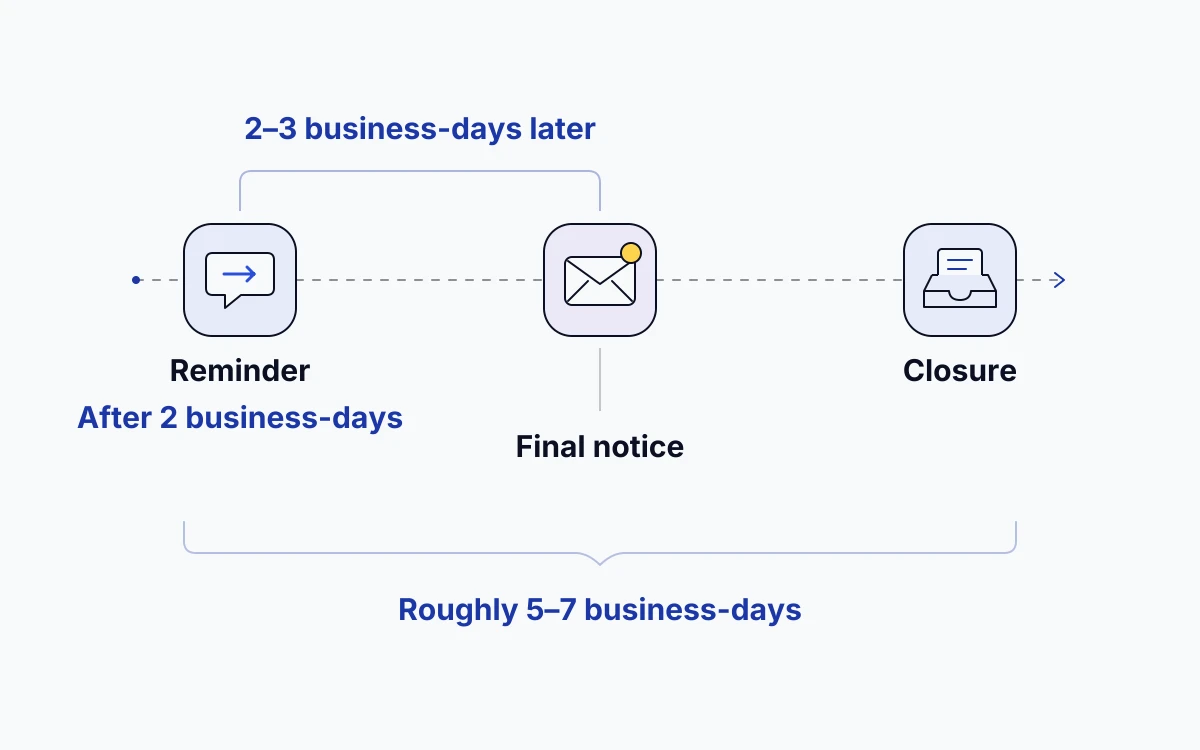
We suggest a reminder after two business days. Then send a final notice two or three business days after that. That’s about five to seven business days in all before you close. Treat this as a starting point for your team to agree on. It isn’t a rule for everyone.
The reminder should ask only for what the agent needs to take the next step. It should also say why it’s needed. The example below has a real cutoff date. Swap in your own date and request details before you send it.
Subject: Information needed to continue your support request
Hi [customer name],
We’re following up on your report that an order is missing from your account. Please send the order number so we can locate the purchase and check its status.
Please send it through [verified support route] by September 18, 2026. We don’t need payment details.
If we haven’t heard from you by then, we’ll send a final notice before closing the request as inactive.
Thank you,
[agent name]
[support team]
Write each contact attempt in the ticket’s internal notes. Note when you sent it, what you asked for, and the deadline you gave. If the customer replies, look at the request again before you hold them to the old cutoff. Act on what they sent. If something important is still missing, explain why you need it and set a new deadline.
Keep follow-ups with the conversation
We keep follow-ups with the conversation and everything attached to it. That way the next agent can see what’s still holding the ticket up. Each message is made personal before it’s sent. The record of every contact stays next to the work.
In coview, you do these steps by hand. You don’t rely on automatic reminders or automatic closing:
- Start from a saved reply and make it specific. Swap the general wording for the customer’s request and the missing detail: “We still need the attachment showing the error before we can investigate that step.”
- Add the contact attempt to the internal notes, as described above. Then another agent can tell whether a follow-up was sent, drafted, or only planned.
- Use chat while the customer is still on the site, and email once they’ve left. Live chat works on every page. Agents and customers can send each other files up to 10 MB. The customer sees the follow-up, but the notes about contact attempts stay internal. The docs page The chat widget covers these chat features.
- Turn a chat that needs more time into a ticket. The session, errors, and steps stay attached. So whoever picks it up sees more than the latest reminder. Tickets, priorities and response targets explains how tickets work.
This keeps the follow-up work tied to the record. For more on handing over the session and its errors, read From chat to ticket without losing the evidence.
Will the replay still be there when you close?
Watch the replay you need before it expires, even while the ticket is still waiting for a reply. What matters is how many days the replay has left on the reply deadline. The day the ticket opened is only part of that sum.
- Free: $0, up to 2 seats, 1,000 recorded sessions a month, kept 7 days.
- Starter: $19 per seat a month billed yearly, up to 10 seats, 5,000 sessions a month, kept 30 days.
On Free, the usual follow-up time above can run past the time replays are kept. This happens once a weekend or an older session is involved. So the replay may be gone before the closing deadline.
Password and card fields are masked in the visitor’s browser, and so are elements marked data-coview-mask. This holds in replays and live, so those details never reach us. Privacy, masking and retention has the details.
These time limits apply to replays only. Our docs don’t say how long tickets and emails are kept. Closing a ticket doesn’t set a date for deleting its data.
Have a person check before you close
A person should look at every ticket before it’s closed for no response. Finish whatever the team can do without the customer’s input. Hold the exceptions back for review.
Read the whole conversation before you send anything, and check that:
- The ticket number, phone number, other contact details, and reply deadline are correct.
- The original question was answered as far as possible, the right attachment was sent, and any documents you asked for are clearly named.
- Follow-ups went through the contact method the customer prefers, and each attempt is written down.
Urgent matters go to a person for review, not through the usual no-response steps. Call the customer when that makes sense, and log the call.
Disputes, refunds, safety issues, warranty claims, and cases with repeated misunderstandings also stay with a person. A missed deadline alone never closes them.

We build coview: session replay, co-browsing, chat and calls for support teams. Questions about a post? Ask us from the contact page.